top of page

How it Works

Getting on to the Industrial App Store, setting up your data sources, and using it on apps 

Keyboard and Mouse

Step 1

And log in with your Microsoft work credentials

Image showing the Microsoft sign in button for the Industrial App Store

Step 3

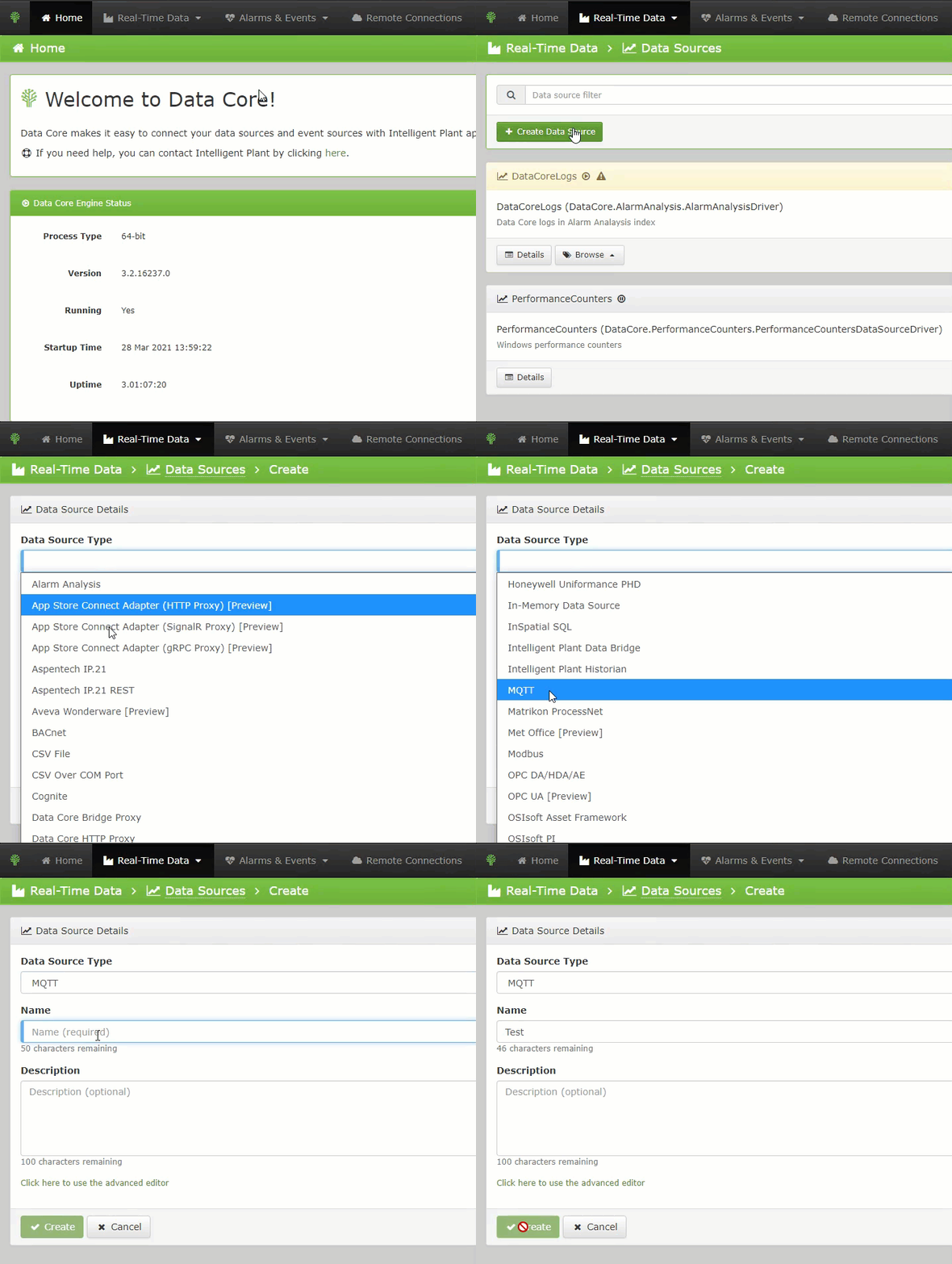
Set up data sources and permissions
in App Store Connect

a gif that shows one of the steps required for setting up a data source

Step 2

Download and install App Store Connect onto your business network (i.e. in the cloud or on site, it's up to you!)

App Store Connect app card

Step 4

Purchase and use apps from 
the store with your data

Image of the Industrial App Store and the different apps available
Popular Apps on the Industrial App Store

Azimuth

Ensure efficient maintenance scheduling on major pieces of rotating equipment.


Facit

Facit aggregates alarms and alerts into an intuitive dashboard to allow easy tracking, work flow management and automatic task auditing.


App Store Connect

Easily connect your data to the

Industrial App Store and share it with apps and other users.

OpMode

Use machine learning to easily define different operating modes on your plant from multiple PVs.

 
logos of popular app on the Industrial App Store

Power Automate Connector

Microsoft Power Flow/Automate

IAS Connector.


SEER

Hyper Power Root Cause Analysis of multiple events by using all the data you have on previous occurrences.


Sequence of Events

Perform filtering and advanced searches on the sequence of events.


Power BI Connector

Utilise real-time and historical industrial data in Microsoft Power BI.


UoA - Team Hotel - Student Analysis Tool
04:13
UoA - Team Lima - ARO Corpus
07:33
RGU - KindFind
02:27
UoA - StorageBuddy
04:08
The Inform Prize 2026 - Karen O'Hanlon ONE Digital Tech
01:06
UoA - Team Bravo - CreaTour
03:38
The Inform Prize 2026 - Judges
01:35
RGU - Lecturer Ross McLean
01:32

Usine intelligente limitée.

Premier étage,

489, rue Union,

Aberdeen, en Écosse.

Royaume-Uni

AB11 6AZ

Tél: +44 (0) 1224 596001

Courriel: info@intelligentplant.com

Intelligent Plant 20th anniversary logo
  • Youtube
  • LinkedIn

© 2020 par Intelligent Plant. Fièrement créé avec Wix.com

bottom of page